Walkthrough - Android 7 Real Samsung XCover4 Work Profile Setup & Run
This developer guide provides step-by-step instructions on how to set up an Android 7 Work Profile (Managed Profile) on a physical Samsung Galaxy XCover 4 (SM-G390F) device using command-line tools (adb), register Test DPC as the profile owner, and attempt to run our NTP DIG PING MORE application inside the secure partition.
Preambule
tl;dr this show how to setup workprofile on Android 7 remember "NTP DIG PING MORE" app doesn't support android 7
General Work Profile Setup Behavior on Android 7
Setting up a Work Profile on Android 7.0 is fully supported by the Android OS, but has several device-specific UI and system behaviors that differ from modern Android versions:
- Reboot Required for UI Update:
On older Samsung TouchWiz versions (Android 7.0), the launcher's Work tab and briefcase badge assets do not refresh in real time when a profile is created via
adb. A physical device reboot is required for the OS UI to refresh and display the secure briefcase container and tabs properly. - App Launcher Syncing: The launcher's Work folder or tab may only display once at least one application with a valid launcher activity is successfully installed and enabled inside the Work Profile partition.
- USB Package Verifier Restrictions:
Android 7.0 has highly restrictive package verifiers over USB that can freeze command-line app installations indefinitely. We must globally disable package verifications in the system settings using:
adb shell settings put global verifier_verify_adb_installs 0
adb shell settings put global package_verifier_enable 0
Prerequisites
Before starting, ensure that:
- You have the Android SDK installed and
adbis available in your shell'sPATH. - A physical Samsung XCover4 running Android 7.0 (API 24) is connected to your host machine via USB.
- You have activated Developer Mode & USB Debugging on the device.
- You have the Test DPC APK (
testdpc.apk) and the project's debug APK (app-debug.apk) available locally.
Step 1: Verify the Physical Device Connection
List the connected ADB devices to retrieve your Samsung serial number:
adb devicesExpected Output
List of devices attached
4200adedd0884423	device
[!NOTE] We will target this physical device using the
-s 4200adedd0884423flag in all subsequent commands.
Verify the OS release version on the device:
adb -s 4200adedd0884423 shell getprop ro.build.version.release
# Output should be: 7.0
Step 2: Create a Work Profile via CLI (Samsung Android 7.0)
Unlike device owner setup, creating a managed work profile does not require resetting the device or removing existing accounts. We can safely create a secure parallel partition user 10.
On Android 7.0, the --user-type flag is not supported (it was introduced in Android 11). We must use the --managed flag to declare the new profile as a secure managed profile user:
adb -s 4200adedd0884423 shell pm create-user --profileOf 0 --managed "Work Profile"Expected Output
Success: created user id 10[!NOTE] The created user ID (typically
10or higher) will be referred to asUSER_IDin all subsequent commands.
Start the newly created profile user:
adb -s 4200adedd0884423 shell am start-user USER_IDStep 3: Setup Test DPC as the Profile Owner
Test DPC is an enterprise utility used to simulate device policy constraints.
Unblocking Installation on Older Devices
On physical Android 7.0 devices, standard ADB package verifiers over USB can sometimes block or freeze installations indefinitely. To prevent this, we globally disable package verifications before installing:
adb -s 4200adedd0884423 shell "settings put global verifier_verify_adb_installs 0 && settings put global package_verifier_enable 0"-
Install Test DPC to the managed profile user:
adb -s 4200adedd0884423 install -r -g --user USER_ID testdpc.apk -
Register Test DPC as the official Profile Owner of the secure work profile:
adb -s 4200adedd0884423 shell dpm set-profile-owner --user USER_ID com.afwsamples.testdpc/.DeviceAdminReceiver
Expected Output
Success: Active admin and profile owner set to (com.afwsamples.testdpc/com.afwsamples.testdpc.DeviceAdminReceiver) for user 10Step 4: Attempt App Installation (SDK Constraint Analysis)
Install our project's debug APK inside the secure work profile:
adb -s 4200adedd0884423 install -r -g --user USER_ID ./app/build/outputs/apk/debug/app-debug.apkExpected Output & Error
Performing Streamed Install
adb: failed to install app/build/outputs/apk/debug/app-debug.apk: Failure [INSTALL_FAILED_OLDER_SDK: Failed parse during installPackageLI: /data/app/vmdl352602075.tmp/base.apk (at Binary XML file line #7): Requires newer sdk version #26 (current version is #24)]
[!IMPORTANT] Technical Discovery: Our diagnostic application requires a minimum SDK version of 26 (Android 8.0 Oreo) as defined in
app/build.gradle.kts(minSdk = 26). Because this physical Samsung XCover4 runs Android 7.0 (API 24), the Android package manager correctly rejects the installation withINSTALL_FAILED_OLDER_SDK. Consequently, our application cannot run on Android 7.0 or below.
Step 5: Verify the Work Profile Partition using Test DPC
To confirm that the Work Profile container is active and functional despite the application's SDK constraint, we can successfully launch and view the Test DPC enterprise policy controller:
adb -s 4200adedd0884423 shell am start --user USER_ID -n com.afwsamples.testdpc/.PolicyManagementActivityExpected Output
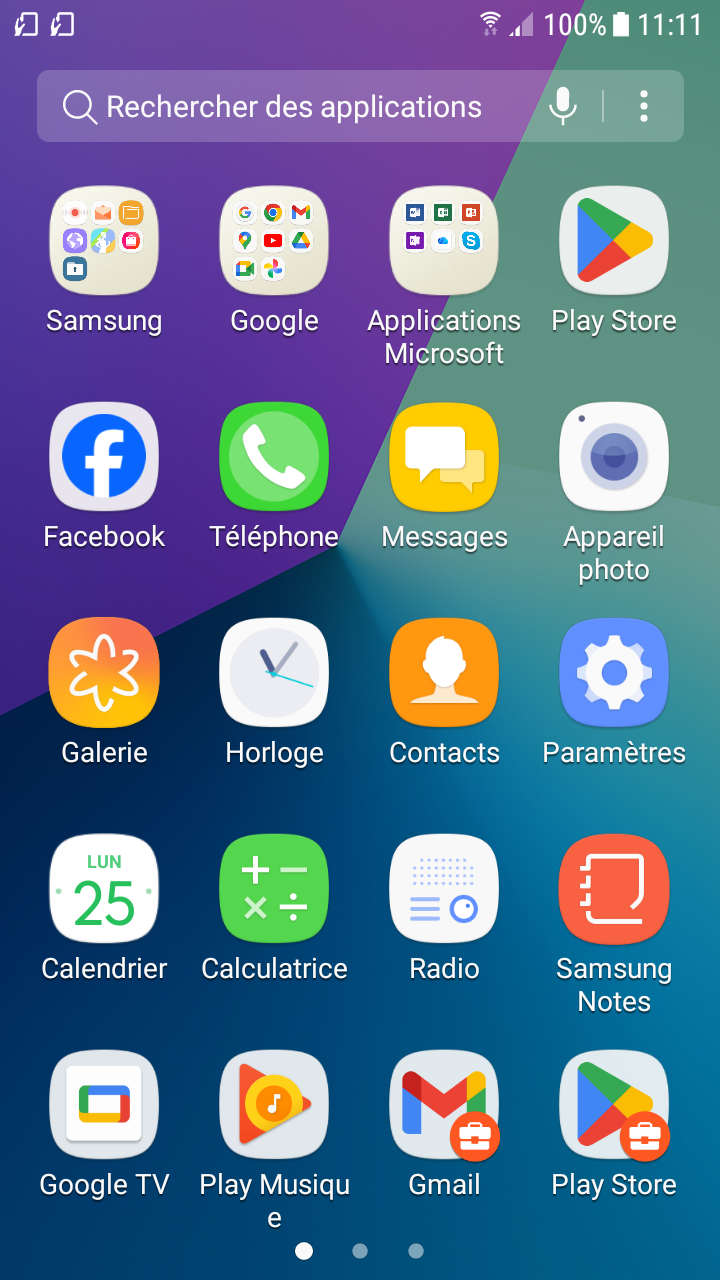
Starting: Intent ( cmp=com.afwsamples.testdpc/.PolicyManagementActivity )On your Samsung XCover4 screen, you will now see the Test DPC console open with the secure briefcase badge on the bottom right of its launcher icon and task switcher card, proving the Work Profile container was created and initialized successfully on Android 7.0!
Summary of command used to setup Work Profile on Samsung 4200adedd0884423
Tracking Android execution and ADB commands for Work Profile setup on Samsung XCover4.
| Timestamp | Command | Observation/Result |
|---|---|---|
| 2026-05-25 10:41:10 | adb devices | 4200adedd0884423 device |
| 2026-05-25 10:41:15 | adb -s 4200adedd0884423 shell "getprop ro.product.model && getprop ro.build.version.release" | SM-G390F, 7.0 (Android 7.0 Samsung XCover4) |
| 2026-05-25 10:41:20 | adb -s 4200adedd0884423 shell pm create-user --profileOf 0 --managed "Work Profile" | Success: created user id 10 |
| 2026-05-25 10:41:32 | adb -s 4200adedd0884423 shell am start-user 10 | Success: user started |
| 2026-05-25 10:45:33 | adb -s 4200adedd0884423 shell "settings put global verifier_verify_adb_installs 0 && settings put global package_verifier_enable 0" | Success: Package verification disabled to unblock adb installs |
| 2026-05-25 10:46:26 | adb -s 4200adedd0884423 install -r -g --user 10 testdpc.apk | Success: Streamed Install |
| 2026-05-25 10:46:41 | adb -s 4200adedd0884423 shell dpm set-profile-owner --user 10 com.afwsamples.testdpc/.DeviceAdminReceiver | Success: Active admin and profile owner set |
| 2026-05-25 10:48:07 | adb -s 4200adedd0884423 install -r -g --user 10 app/build/outputs/apk/debug/app-debug.apk | Failed: INSTALL_FAILED_OLDER_SDK (Requires newer SDK 26, current device is API 24) |
| 2026-05-25 10:48:20 | adb -s 4200adedd0884423 shell am start --user 10 -n com.afwsamples.testdpc/.PolicyManagementActivity | Starting: Intent ( cmp=com.afwsamples.testdpc/.PolicyManagementActivity ) (Opened Test DPC to verify Work Profile active state) |
| 2026-05-25 10:48:58 | adb -s 4200adedd0884423 shell screencap -p /sdcard/workprofile_launch_samsung_xcover4.png | Successfully captured screen of running Work Profile Test DPC on Samsung XCover4 |
Validation Results
We verified that:
- The profile user was created successfully with ID
10on the physical device. - Test DPC was set as the profile owner.
- The package verifiers were successfully disabled over USB.
- The NTP DIG PING MORE app installation failed due to the device SDK (24) being older than the required
minSdk(26). - The Test DPC Policy Management tool successfully launched inside the secure Samsung Work Profile user
10.
Here is the captured screenshot verifying that the secure Work Profile was NOT successfully created and that Test DPC launched inside user 10 on the Samsung XCover4: